psytraxx/esp32-homecontrol-no-std-rs
A microcontroller-based system for automated plant watering with ESP32. Monitor soil moisture and control watering pump.
npx skills add psytraxx/esp32-homecontrol-no-std-rsREADME
ESP32 Plant Watering System
A microcontroller-based system for automated plant watering with ESP32. Monitor soil moisture and control the watering pump.
Built for LilyGO T-Display-S3 ESP32-S3 development board
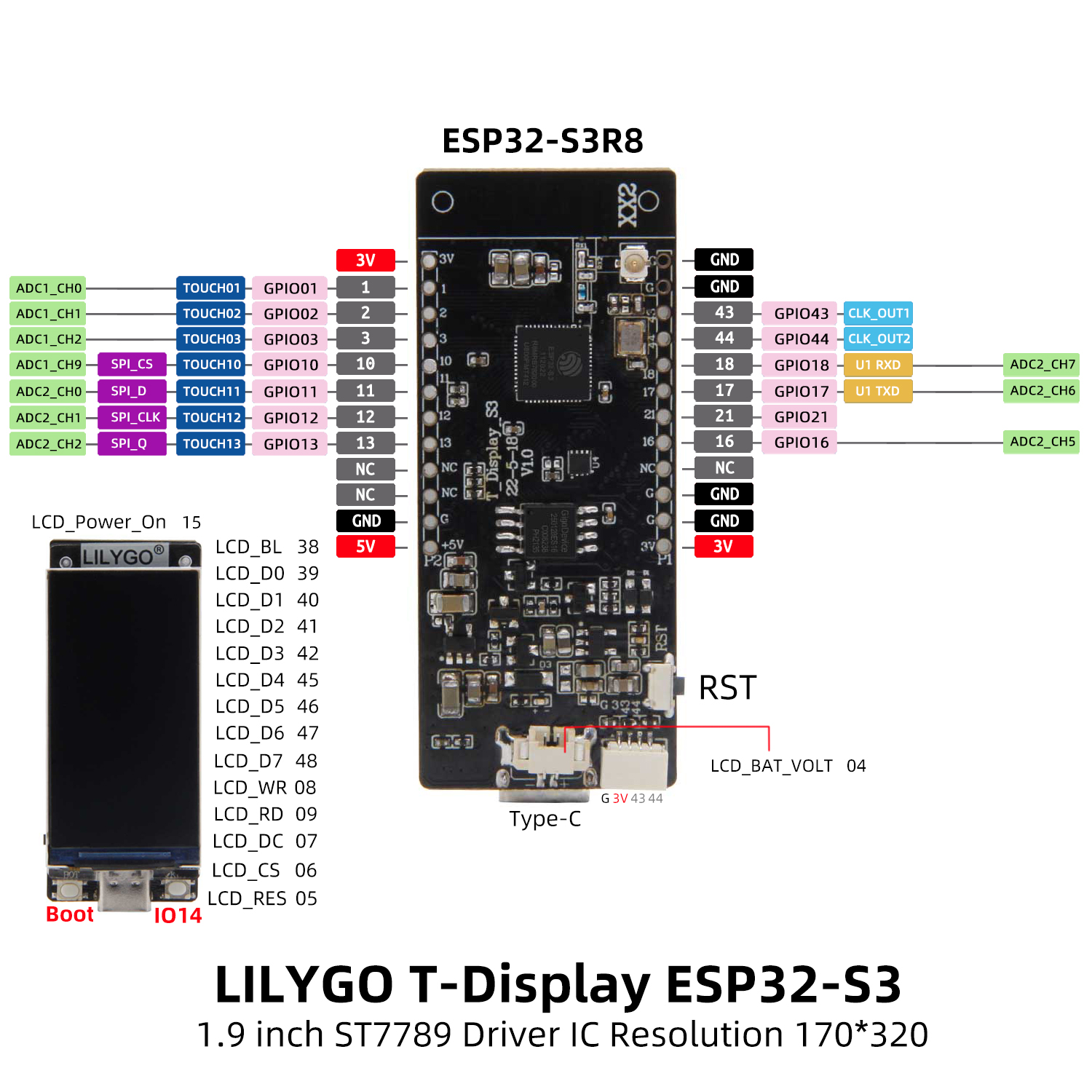
Board Features:
- ESP32-S3 dual-core MCU
- 1.9" LCD Display (170x320)
- USB-C connector
- Built-in battery management
Wiring
- DHT11 Digital (Temperature/Humidity) → GPIO1
- Water Pump Relay → GPIO2
- Battery Voltage → GPIO4
- Moisture Analog → GPIO11
- Moisture Power → GPIO18
- Water Level Analog → GPIO12
- Water Level Power → GPIO21
Core Features
-
Sensor Integration
- DHT11 temperature/humidity monitoring
- Capacitive soil moisture sensing (analog)
- Water level detection
- Battery voltage monitoring
-
Display Interface
- ST7789 LCD support
- Real-time sensor data visualization
- System status display
-
Network Connectivity
- WiFi connection with DHCP
- MQTT integration with Home Assistant
- Auto-discovery of sensors
- Remote pump control
-
Power Management
- Deep sleep support
- Configurable wake/sleep cycles
- Battery-optimized operation
Dependencies
The project uses several Rust crates to provide functionality:
Async/Embedded Frameworks
Hardware Abstraction & Embedded I/O
Networking
ESP32-Specific Crates
Display
The built-in 1.9" ST7789 LCD display on the T-Display-S3 has the following pin configuration:
-
Backlight: GPIO38
-
CS: GPIO6
-
DC: GPIO7
-
RST: GPIO5
-
WR: GPIO8
-
RD: GPIO9
-
Data pins: GPIO39-42, GPIO45-48
Serialization
Miscellaneous
- heapless
- static_cell
- rand_core
- ...and others
Setup
1. Clone the repository
git clone https://github.com/yourusername/esp32-homecontrol-no-std-rs.git
cd esp32-homecontrol-no-std-rs
2. Install Rust and the necessary tools
See the ESP-RS book.
Install espup: espup GitHub
espup install
. $HOME/export-esp.sh
3. Build and run the project
cp .env.dist .env
./run.sh
Development Tools
Validate Agent Skills
To validate the .claude/skills directory structure:
# Install skills-ref validator (one-time)
cd /tmp
git clone https://github.com/agentskills/agentskills.git
cd agentskills/skills-ref
pipx install .

# Validate the skill
skills-ref validate .claude/skills/esp32-rust-embedded
Usage
To flash the firmware to your ESP32 device, run:
cargo run --release
Useful Links
DHCP & Wi-Fi
MQTT Communication
Display Interfaces
Sensors
UI & Graphics
Projects and Games
...
